

For a content creator, a coach or an agency, social media competitive analysis has little to do with monitoring what people say about your own brand. It means following the accounts in your niche to spot the videos that outperform, understand why, and turn that signal into content ideas. Most guides on the topic are written for brand marketing teams; this one covers the other use, the more practical one if you publish short-form content.
Two different practices under the same name
The term “social media monitoring” covers two distinct practices, with different goals and different tools.
Brand reputation monitoring tracks mentions of your brand, product or name across the web and social media: customer reviews, press mentions, sentiment around a news story. It helps you react fast to a PR crisis or measure overall perception. That’s the territory of tools like Mention, Brandwatch or Talkwalker, built for communications and PR teams.
Creator-focused monitoring, the subject of this article, tracks posts from accounts comparable to yours: direct competitors, inspiration accounts, accounts adjacent to your niche. Its goal is to spot what works elsewhere to feed your own content ideas; what people think of you is a separate question. That’s what Creadar covers.
Mixing the two up leads to the wrong tool: brand monitoring software will never tell you that a competitor’s video hit 5 times its usual median, because that’s not what it’s built for.
Why it matters for a creator, coach or agency
A creator who posts regularly quickly runs out of fresh ideas by looking only at their own account. Watching your niche widens the view: seeing a hook format come back across several comparable accounts, or a specific topic drive unusual engagement for a direct competitor, gives you concrete clues about what your audience wants to see right now.
For a coach or an online course creator, competitive analysis also helps fine-tune your positioning: if three accounts in the same niche suddenly post about the same angle, the market is shifting, or an outside event is pushing it.
For an agency managing several client accounts, it also helps back content recommendations with concrete examples rather than gut feeling.
In all three cases, the common thread is understanding why a video stands out so you can adapt the principle to your own content, without copying it.
Step 1: define a narrow niche to monitor
The first mistake is trying to follow “digital marketing” or “cooking” as a whole: the niche is too broad, the signal gets diluted, and the number of videos to check becomes unmanageable. A useful niche is narrow: accounts whose target audience, format and tone are close enough to yours that their wins can carry over.
In practice, a useful watchlist usually includes:
- 3 to 5 direct competitors, who speak to exactly the same audience as you
- 5 to 10 inspiration accounts in an adjacent space, showing formats that could reach your niche
- 2 to 3 large benchmark accounts in your industry, to make sure you’re not missing a broader trend
Between 10 and 20 accounts is plenty to start.
Step 2: the free, manual method to get started
Before you set up any tool, manual monitoring already teaches you a lot and costs nothing but time.
- List the accounts in your niche in a simple spreadsheet, with one column per platform (Instagram, TikTok, YouTube).
- Visit each profile once or twice a week and write down the view counts of the latest posts.
- Calculate a rough median of each account’s last 10 videos: that’s the creator’s personal baseline.
- Spot the videos that clearly beat that median, for example by 3x or more. That signal deserves your attention far more than the raw view count.
- Note the format, hook and topic of each standout video in a dedicated column.
- Come back to the spreadsheet every week to spot formats that show up across several accounts at once: it’s often the sign of a trend rising in your niche.
This method works, but it has a clear limit: it stays manageable up to about 10 to 15 accounts. Beyond that, recalculating medians and checking every account by hand each week takes too long.
Here’s what that spreadsheet looks like for four French-speaking fitness coaching accounts over the week of September 22 to 28, 2026 (views collected on October 20):
| Account | Median of the previous 10 videos | Best video of the week | Ratio |
|---|---|---|---|
| @emmafitnessgoal | 2,159 views | 41,465 views (Sept. 26) | 19.2x |
| @coachfonceur7 | 3,881 views | 8,127 views (Sept. 25) | 2.1x |
| @hemtonkine | 2,897 views | 4,637 views (Sept. 28) | 1.6x |
| @bodytime | 34,954 views | 6,493 views (Sept. 24) | 0.2x |
Only one row deserves a closer look: the @emmafitnessgoal video, nearly 20 times above its median. The other three accounts stay within their usual range, or well below it in the case of @bodytime, which is useful information too.
Why a median per creator beats a single threshold
The most common beginner mistake is comparing every tracked account against the same view threshold, for example “anything over 50,000 views is worth a look.” That absolute threshold automatically favors the biggest accounts on your list and misses relevant signals from smaller ones: in the table above, no video would have crossed it, not even the one from @emmafitnessgoal.
An account that usually tops out at 2,000 views and gets 10,000 has scored a rare, meaningful hit with its own audience, even if 10,000 views is a modest number next to a big account in the same niche. To dig deeper into this logic, see our guide on how many views it takes to go viral on TikTok, which applies the same principle to virality.
Step 3: switch to a tool when manual monitoring gets too heavy
The sign that it’s time for a tool is simple: you spend more time checking accounts than making content, or you discover a video that outperformed weeks after it was posted, far too late to act on it.
A creator-focused monitoring tool should do three things that manual monitoring can’t sustain at scale:
- Track a large number of accounts automatically, without opening each profile by hand.
- Calculate each tracked creator’s personal median and flag the videos that clearly beat it, instead of ranking everything by raw views.
- Bring the signal together across platforms (Instagram, TikTok, YouTube), so you can see in one place what’s outperforming across your whole niche.
That’s the logic behind Creadar: build watchlists of Instagram, TikTok and YouTube Shorts creators, and let the tool flag every video whose views or engagement reach 3 times the median of its creator’s last 20 eligible videos. Engagement, (likes + comments) ÷ views × 100, helps you tell a video that gets passive views apart from one that truly drives interaction.
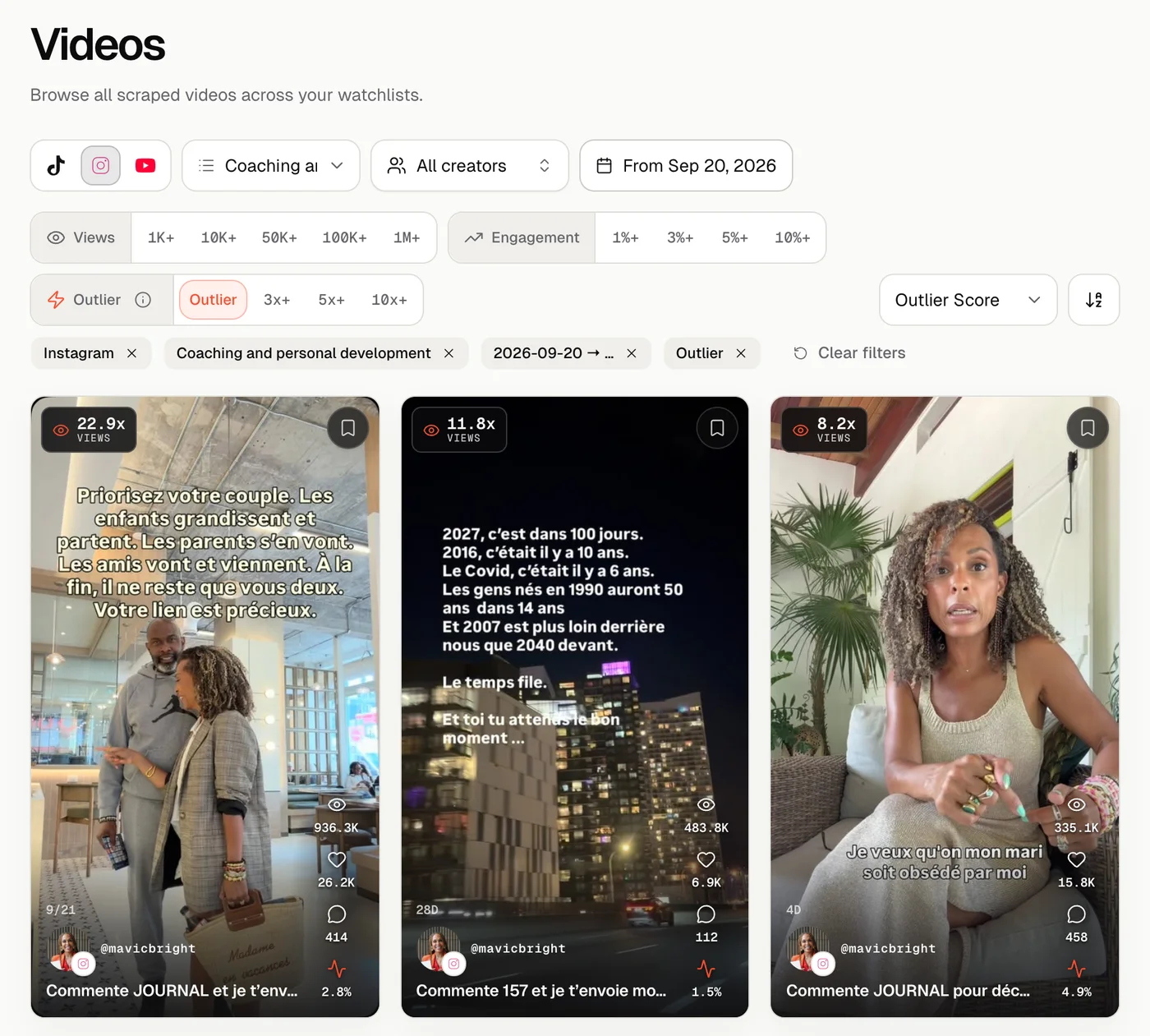
Here, two posts from @mavicbright stand out at 22.9x and 11.8x the median of the account’s last 20 videos. The manual spreadsheet above does a similar calculation over 10 videos; the tool does it every day, over 20 videos and for every account in the watchlist, without you opening a single profile.
Creadar is still a new product, with limits worth knowing: it has no keyword search and only covers accounts added to a watchlist; it doesn’t write video scripts for you either. Plans range from €18/month for 10 tracked creators to €95/month for 100 creators, with a free preview (a one-time analysis of 3 accounts, no credit card) so you can test the approach before subscribing.
For a broader selection of tools, including those built for brand reputation monitoring, see our roundup of social media monitoring tools.
Step 4: turn the signal into a content idea
Spotting a standout video is only half the job. The other half is understanding why it worked: the hook in the first three seconds, the structure of the edit, the topic, the format (tutorial, storytelling, before/after). Noting these elements for every signal you find lets you build, week after week, a library of patterns that keep coming back in your niche.
This lines up with what the platforms say about their recommendations, which rely largely on viewers’ attention and interactions. Our guide to the TikTok algorithm in 2026 details the signals the platform officially documents, which help you interpret why a video you spotted really took off.
How much time to spend on competitive analysis each week
Useful monitoring doesn’t take hours every day. With a tool that has already sorted out the standout videos, a 30- to 45-minute session once or twice a week is enough to go through a list of 10 to 20 accounts. Without a tool, plan on 2 to 3 hours for 10 to 15 accounts, the time it takes to visit each profile, recalculate medians and note the signals.
Consistency matters more than occasional bursts: monitoring done once every two months misses most signals, because a trend in a short-form niche often lasts only a few weeks.
The bottom line
For a creator, coach or agency, social media competitive analysis has nothing to do with watching over your brand: it means following comparable accounts, comparing each video with its own creator’s baseline, and spotting the signals that show up across several accounts at once. The manual method is enough to start and stays manageable up to 10 to 15 accounts; beyond that, you need a tool that automates the comparison so you catch signals in time to act on them.
To go further, read our guide to the TikTok algorithm in 2026 to understand what the platforms actually reward, and our roundup of social media monitoring tools to pick the right option for your use, whether it’s content creation or brand reputation.